SitePal AI Assistants are now available. The new feature gives Gold and Platinum subscribers a built-in reasoning engine for creating knowledgeable, conversational avatar experiences—without requiring a separate 3rd party AI service.
The Beta period is open-ended, with no predetermined end date. During the Beta period, AI Assistants are included with Gold and Platinum plans at no additional charge, subject to usage limits. We do not intend to charge Gold and Platinum customers extra for AI usage credits during the Beta. After the Beta, we expect to include a good amount of AI usage credits with each plan, with excess AI usage priced competitively.
What Has Changed?
Connecting a SitePal avatar to an AI knowledge base has been possible for some time. Until now, however, customers had to pair SitePal with a third-party service such as OpenAI or Chatbase. Those services remain available for customers who prefer them, but they are no longer required.
With AI assistants built into SitePal, the process is simpler. You can train an assistant using your own company website(s) and/or your product documentation, then add instructions that shape how it responds. The assistant will use the information to answer questions about your company, products & services.
The result is a practical way to make information available through an interactive avatar—whether the goal is helping visitors understand a product, answering common support questions, guiding prospects through choices, or providing information after business hours.
Straightforward Setup, With No Coding Required
Building your AI Assistant & connecting it to your AI Avatar does not require programming or complex integration. Here are the big picture steps:
Log-in to your SitePal account and choose AI Center from the main menu. Proceed to ‘AI Assistants’.
In your assistant’s Train panel, add websites and documents & click the ‘Train’ button. You can also instruct your assistant what to emphasize, how to communicate, or how to handle particular questions.
Interact with your assistant in the Preview panel. Fine-tune responses in the Log panel.
Once your assistant has been trained, go back to the AI Center, and delve into the ‘AI Avatars’ section.
Use the AI Avatar Wizard to create an interactive smart avatar for your website. When prompted to select your Avatar’s Assistant, select the Assistant you just created & trained. No coding needed.
Embed your newly created AI Avatar into your web page.
The built-in connection between the assistant and the avatar wizard reduces the number of tools, accounts, and steps involved.
Designed for Avatar-Human Interaction
A reasoning AI model can generate a response to any query, but responses intended for avatar interaction must satisfy certain specific requirements. Such responses will be spoken aloud, and must feel natural in a back-and-forth exchange. They must fit the pace and expectations of a human-facing conversation. That consideration impacts the length of the expected response, as well as the response time (often referred to as the ‘latency’). We provide you with ways to affect both.
AI assistants, if not told otherwise, often respond with article length information. In a conversation, it is not usually helpful to receive a very long answer to one’s question. A concise summary is usually expected & preferred. One can always ask for additional details & so direct the conversation further. That is why we’ve implemented a configurable limit to assistants’ responses. In your assistant’s settings you may adjust this limit to suite the temperament of the interaction you wish to provide.
SitePal AI Assistants use OpenAI models. You may select the model you prefer in your assistant’s settings. During the Beta period, we’ll be making available certain options, with an emphasis on performance. Models that take too long to respond are ill suited for interactive conversation. Moving forward, as additional models are made available, we will indicate the expected reasoning / performance ratio for each option.
Understanding Current Limits
SitePal usage continues to be measured in streams. Note: Platinum plans include unlimited streams.
But AI Assistants also have limits that are specific to the new capability:
Number of assistants: Gold subscribers can create one assistant; Platinum subscribers can create up to five.
Training data: Gold subscribers can upload up to 10 MB of text for assistant training. Platinum subscribers can upload up to 50 MB of text. Note: Images, media, and other non-textual data do not count toward these limits.
These limits are intended to make the Beta available and manageable while we gather customer feedback. If a Gold customer needs more assistants or training data, upgrading to Platinum is an option. If a Platinum customer requires more, contact sales@sitepal.com for assistance. We do not intend to charge for additional usage during the Beta, although that policy may change.
Start Building Your Assistant
SitePal AI Assistants make it easy to turn company knowledge into a useful, interactive avatar experience. You can use information already published on your website, add support documentation, provide your own instructions if you wish, select the balance of speed and reasoning that fits your needs, and publish the result to your web page without any coding.
To get started, log-in to your SitePal account and select AI Center from the main menu. The feature is available now in open Beta to our Gold and Platinum subscribers at no additional charge, subject to the Beta limits described above.
Because this is a Beta release, your feedback is especially valuable. If you encounter a problem or have a suggestion, contact us at support@sitepal.com. Your feedback will help us improve.
Hello SitePal Fans!
We’re excited to introduce a brand new avatar category — Tycoons!
This collection of 12 avatars (6 women and 6 men) projects status, success, and wealth beyond measure. Whether your website serves wealth management, luxury goods, financial advisory, corporate consulting, executive coaching, or premium retail — these avatars are ready to represent your brand with unmatched sophistication.
Each avatar brings a distinct, polished look tailored for high-end applications where projecting trust, success, and confidence is paramount. Pair them up with authoritative 3rd party voices for best results.
Check out the new Tycoons in your SitePal account. Or use these links for a quick preview –
Mr. De AlbaMs. BeaumontMr. JamiesonMs. De LeonMr. MortimoreMs. DupontMr. NakamuraMs. LamarMr. OkaforMs. LeeMr. SterlingMs. Nguyen
Now some of you may be thinking – these avatars are great, but they are not generative AI video avatars. You’d be right. But that’s a positive – if you are looking for a solution that works with any AI Agent technology & supports mass traffic affordably.
If you can’t find what you’re looking for in our collection, create your own 3D avatar from a photo using our Photoface 3D tool, or ask us to create a custom avatar for you. Watch our 6 minute Photoface 3D Tutorial Video to see what you can do with this unique tool.
We’re hard at work on new SitePal features & capabilities (and more great new avatars too!). Stay tuned for further updates…
Cheers!
The SitePal Team
https://www.sitepal.com/contact
Introduction
This study compares published pricing from SitePal, HeyGen, D-ID, and Soul Machines so you can see what each platform charges and how costs scale as usage grows.
An ‘AI Avatar’, for the purpose of this study, is an interactive animated visual agent that can be engaged in real-time conversation. Some of the brands mentioned here also provide tools for generating and downloading pre-recorded videos of speaking avatars. That use case is outside the scope of this study. We’re focused solely on interactive avatars.
We’ve attempted to represent information clearly and in an unbiased way. Being on the SitePal team we clearly have an agenda, but we believe we would not be promoting our agenda effectively by presenting incorrect or misleading information.
All the data presented here comes from current published information from each of the brands mentioned. In some cases cost figures had to be extrapolated because high-volume pricing was not available. In such cases our estimate uses each provider’s best published rates — footnotes explain the methodology. Another challenge we faced is that different companies use different terminology and metrics to track usage and costs, and some use tokens as an intermediary form of payment. We have done our best to convert everything to common metrics and avoid confusion. If you believe we have erred, or if you have any feedback, we’d appreciate hearing from you at sales@sitepal.com.
What Does Each Platform Charge?
Adding an interactive AI avatar to your website costs anywhere from a few dollars to thousands of dollars per month — depending on the platform and your usage level. A major part of the difference comes down to architecture. Video generated on the server and streamed in real-time to support an interactive conversation is inherently more expensive to deliver and scale than a solution rendered on the client side. We’ve written about this before — so we won’t expand further here.
Here are the published prices from each platform’s pricing page as of June 2026. All prices shown are monthly with annual billing where available.
SitePal — Monthly Rate (with annual plan)
Plan
Monthly Price
Audio Streams/mo
Minutes (equiv.)
Cost/Min
Bronze
$11
3,000
~1,000
~$0.011
Silver
$20
8,000
~2,667
~$0.007
Gold
$38
30,000
~10,000
~$0.004
Platinum
$217
Unlimited
Unlimited
Flat rate
SitePal measures usage in “audio streams” — each stream is a single spoken utterance, up to ~60 seconds long. Spoken audios longer than 60 seconds count as multiple streams. Shorter ones, no matter how short, still count as one stream.
Other providers measure usage in “video minutes” (or equivalent), so we’ve converted SitePal’s stream count to minutes for comparison. Based on analysis of actual SitePal usage patterns, average audio stream length is approximately 20 seconds. Using that figure, one video minute is roughly equivalent to 3 audio streams. (For more detail on this methodology, see our earlier blog post: How Much Does It Really Cost to Put an AI Avatar on Your Website?)
HeyGen offers both a video creation platform and LiveAvatar, their real-time interactive streaming product. For interactive website avatars, LiveAvatar is the relevant offering. LiveAvatar is hosted separately at liveavatar.com and operates on its own credit system, independent of HeyGen’s video creation plans.
How LiveAvatar credits work:
LiveAvatar offers two integration modes that determine how credits are consumed:
Mode
What You Provide
Credit Rate
Lite
You handle all audio (your own LLM and TTS)
1 credit = 1 min
Full
HeyGen handles STT + LLM + TTS + avatar
1 credit = 30 sec
The Lite mode is the closest comparison to SitePal’s model — you supply your own language model and text-to-speech, and HeyGen provides the avatar streaming. (SitePal includes built-in speech recognition, and built-in LLM is coming soon.)
LiveAvatar plans:
Plan
Monthly Price
Credits
Minutes (Lite)
Cost/Min (Lite)
Starter
$19
150
150
$0.13
Essential
$99
1,000
1,000
$0.10
Business
$475
5,000
5,000
$0.10
Source: help.heygen.com, liveavatar.com — retrieved June 2026.
D-ID — Agents
D-ID offers interactive “Agents” — real-time streaming avatars delivered via WebRTC that can be embedded on websites. D-ID also offers pre-recorded video creation, but we focus here on their interactive streaming product.
API plans (streaming minutes):
Plan
Monthly Price (annual plan)
Streaming Minutes
Cost/Min
Build
$14.40
32
$0.45
Launch
$35
90
$0.39
Scale
$138.60
400
$0.35
Enterprise
Custom
Custom
Custom
D-ID’s Agents product supports knowledge bases, webhooks, and embeddable widgets.
Soul Machines creates “Digital People” — AI assistants with autonomous emotional responses, lifelike expressions, and natural gestures. Their avatars are among the most visually realistic on the market. Soul Machines Studio provides a self-service platform for creating and deploying interactive AI assistants.
Soul Machines Studio plans (monthly rate with annual billing):
Plan
Monthly Price
Interactive Min/Mo
Cost/Min
Basic
$12
40
$0.29
Plus
$89
350
$0.25
Pro
$2,430
10,000
$0.24
Soul Machines also offers a Free tier for exploration (no interactive minutes) and a Pro + Premium Integrations tier at $2,847/mo with workflow integrations (ServiceNow, Zapier, and others).
Two other platforms appear in AI avatar discussions:
Synthesia launched “Video Agents” in Synthesia 3.0 (October 2025) — interactive avatars that can hold real-time conversations. However, Synthesia’s primary offering remains AI video creation. Interactive minutes are not priced separately; they draw from the same credit pool used for video creation (Starter: 10 min/mo at $19; Creator: 30 min/mo at $89; Enterprise: unlimited, custom pricing). Because interactive usage is bundled with video creation credits rather than offered as a standalone product, a direct per-minute cost comparison is not straightforward.
UneeQ uses the Unreal Engine to render high-fidelity CGI digital humans. Enterprise custom pricing only — no public rates, no self-service signup.
How Do Costs Scale With Usage?
Here the differences become more pronounced.
HeyGen (LiveAvatar), D-ID, Soul Machines, and others use server-side rendering. When a visitor interacts with an avatar, a GPU on the provider’s servers renders the video in real time and streams it to the browser. Every minute of every interaction consumes server resources — and the costs reflect that.
SitePal uses client-side rendering. The avatar’s animated movement is rendered in the visitor’s browser. The server delivers audio and animation data, but the visitor’s device does the rendering. SitePal’s costs don’t scale with the length or number of simultaneous interactions the way server-rendered platforms do.
The table below compares estimated monthly costs at three usage levels, assuming each user interaction averages 2 minutes of avatar speaking time (consistent with the methodology used in our earlier comparison study).
Cost Comparison by Usage Level
Streaming Video Min/Mo
SitePal
HeyGen LiveAvatar
D-ID Agents
Soul Machines
2,500
$20 ¹
$475 ²
~$875 ³
$2,430 ⁴
10,000
$38 ¹
~$1,000 ⁵
~$3,500 ⁶
$2,430 ⁴
60,000
$217 ¹
~$6,000 ⁷
~$21,000 ⁸
~$14,580 ⁹
Notes:
All prices preceded by a tilde (~) are extrapolated from a lower usage pricing tier because the respective products do not list prices for that volume. Negotiated enterprise agreements would likely include volume discounts. However, we did not have access to those rates and used the best method available to us — each provider’s best published per-minute rate.
¹ SitePal: 2,500 min ≈ 7,500 streams → Silver plan (8,000 streams included). 10,000 min ≈ 30,000 streams → Gold plan. 60,000 min → Platinum plan (unlimited streams). All with annual billing.
² HeyGen LiveAvatar in Lite mode (you provide your own LLM and TTS). Business plan ($475/mo) includes 5,000 min in Lite mode — covers 2,500.
³ D-ID Agents: Scale plan ($138.60/mo) includes 400 streaming minutes. At the published Scale rate of $0.35/min, 2,500 min would cost approximately $875. (Build plan monthly price rounded from $14.40; Scale plan rounded from $138.60.)
⁴ Soul Machines: Pro plan ($29,160/year = $2,430/mo) includes 10,000 interactive minutes per month.
⁵ HeyGen: Business plan covers 5,000 min. Additional minutes at $0.095/min would bring the estimated total to approximately $1,000/mo.
⁶ D-ID: At published Scale rate of $0.35/min. Enterprise pricing would apply at this volume.
⁷ HeyGen: Estimated at published Lite rate of $0.10/min. Enterprise pricing would apply at this volume.
⁸ D-ID: Estimated at published Scale rate of $0.35/min. Enterprise pricing would apply and may be lower.
⁹ Soul Machines: Estimated at published Pro rate of $0.24/min. Enterprise pricing would apply at this volume.
For volumes beyond published plan limits, costs are estimated using each provider’s best published per-minute rate. Enterprise agreements typically involve negotiated pricing that may differ from these estimates. Volume discounts may reduce the per-minute rate, but cannot eliminate the cost premium of real-time server-side video generation.
What’s the Tradeoff?
There are genuine tradeoffs worth understanding.
Visual style differs. HeyGen, D-ID, and Soul Machines produce photorealistic video avatars. SitePal uses animated 3D avatars rendered in the browser. If photorealistic appearance is a requirement, these platforms deliver it.
Use case fit differs. SitePal is built for interactive, real-time website conversations. HeyGen’s LiveAvatar and D-ID’s Agents also serve this use case with photorealistic video. Soul Machines targets enterprise deployments with emotionally responsive digital humans.
What you’re paying for differs. With server-side platforms, the cost reflects GPU compute on every interaction. With SitePal, you’re paying a flat subscription because the rendering happens on the visitor’s device. The economics follow the architecture.
The value of each interaction differs. Not every avatar conversation carries the same business value. A visitor asking a quick FAQ is a different scenario from a qualified enterprise prospect in a guided sales consultation. The willingness to spend $0.10–$0.35 per minute depends on what that interaction is worth. When a single conversation can influence a decision worth thousands of dollars, the cost of a photorealistic video avatar may be easily justified. When you’re serving thousands of visitors with routine guidance, support, or training — where the per-interaction value is modest — the math changes.
Which Approach Makes Sense for You?
Matching the right technology to your use case matters more than choosing the “best” platform in the abstract.
Where photorealistic server-side avatars may be worth the cost:
High-stakes, high-value interactions — a virtual sales consultation with a qualified enterprise prospect, a premium advisory session guiding a client through a significant financial decision, or a concierge service providing personalized follow-up. In these settings the conversation may influence thousands of dollars in value, the audience is typically one person, and photorealistic presence may meaningfully affect trust and outcome.
Low-volume, high-impact deployments — internal executive communications, specialized training for small groups, or prestige brand experiences where realism is part of the message.
Where SitePal’s client-side approach makes more sense:
High-volume, everyday interactions — an FAQ assistant on a busy website, a learning module in an online course, a customer onboarding flow, or a help guide in an employee training program. The audience is hundreds or thousands of users, the per-interaction value is modest, and cost at scale is often the deciding factor.
Cost-predictable deployments — when you need a flat monthly rate regardless of how many visitors interact with the avatar, or how long each conversation runs.
Multi-site and multi-page deployments — when avatars are embedded across many pages, domains, or properties, and usage is distributed and difficult to predict.
As we noted in our earlier study, server-side photorealistic avatars are a premium product — well suited for a narrow class of high-value, low-volume interactions where visual realism genuinely moves the needle. Client-side animated avatars are a scalable infrastructure product — suited for the broad range of deployments where reach, reliability, and cost efficiency matter most.
The Bottom Line
The cost difference between server-side video avatars and client-side animated avatars follows directly from the architecture. Generating photorealistic real-time video requires GPU compute for every second of every interaction. Rendering an animated avatar in the visitor’s browser does not.
At 2,500 streaming minutes per month, SitePal costs $20. The most affordable server-side alternative starts at $475. At 10,000 minutes, SitePal is $38 versus $1,000 or more. At 60,000 minutes, SitePal’s Platinum plan costs $217 — estimated server-side costs at that volume range from $6,000 to over $20,000.
That is not a commentary on the quality of any platform’s technology. Photorealistic avatars represent impressive engineering, and for the right use cases — high-value, low-volume interactions — they can deliver real returns.
But many deployments don’t look like that. Customer service, e-learning, product guidance, onboarding, website assistance — scenarios where you’re serving many visitors, each interaction is valuable but not extraordinary. In those cases, cost at scale determines whether the deployment is feasible.
The numbers are worth reviewing before you commit.
Everyone’s excited about AI avatars in education and training.
And they should be. Interactive avatars that guide learners, answer questions, and adapt to individual pace — are a real improvement over passive video and click-through slides.
But here’s the part nobody’s talking about: cost at scale.
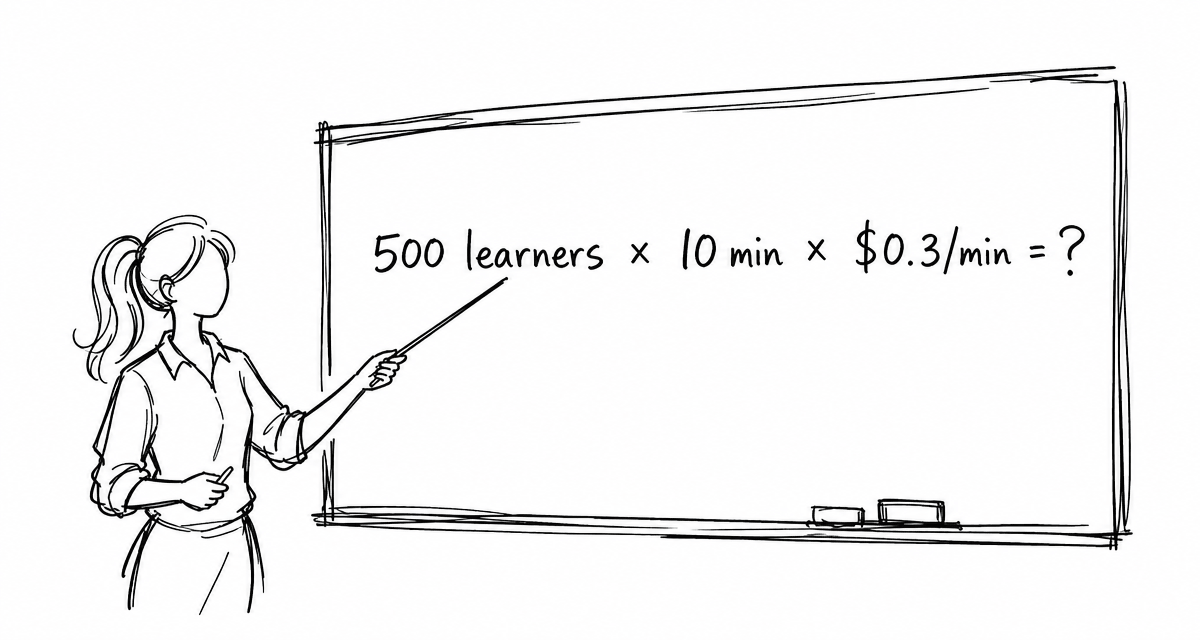
Education is, by definition, about reaching many people. A university course might have 500 students. A corporate onboarding program, 10,000. A compliance training rollout, 50,000+. Online educational programs may cater to even more.
Generative AI avatar platforms generate video on the server, in real time, for every single interaction. That means dedicated GPU compute for each learner, every minute they’re engaged.
At current published rates, interactive server-side avatars run $0.10–$0.45 per minute depending on the platform. That may sound modest — but education is about scale. A 10-minute interactive session across 1,000 learners means 10,000 streaming minutes. At those rates, that’s $1,000–$4,500 in avatar compute alone — for a single training module.
While I’m sure we all agree that every student is precious, and every trainee invaluable, we must place a $ value on each avatar interaction if we are to make this work. And the math doesn’t work for education at scale. It just doesn’t.
That is why rendering architecture matters. When an avatar renders on the learner’s own device — in the browser, no GPU server required — the cost equation changes dramatically. You pay for the intelligence (the AI), not for generating video frame by frame on a remote server.
The difference? Roughly 20–80× in per-interaction cost.
That’s the gap between “impressive demo” and “actually deployed at scale.”
The e-learning market is projected to exceed $400 billion this year. AI-powered training is growing even faster. But the platforms that will actually serve this market aren’t the ones with the flashiest renders — they’re the ones where the economics make sense at scale.
Affordable interactive avatar technology already exists — make sure cost-at-scale is on your evaluation checklist.
Warmly,
The SitePal Team
Sources & further reading:
📊 E-learning market projected to surpass $400B in 2026 — Global Market Insights, Mordor Intelligence, Fortune Business Insights: https://www.custommarketinsights.com/report/e-learning-market/
💰 Interactive avatar pricing comparison — SitePal vs. HeyGen vs. D-ID vs. Soul Machines: https://www.sitepal.com/blog/?p=577 [CHANGED: Replaced individual API pricing links (which pointed to video creation pricing) with our new cost comparison blog post — the definitive source for interactive avatar pricing]
We’re excited to introduce a brand new avatar category — Art World!
This collection of 11 avatars draws from the creative world, featuring art world individuals of diverse nationalities. Whether your site serves a museum, a gallery, an arts education program or creative agency — these avatars are ready to be your on-screen talent. No diva behavior, we promise.
Each brings a distinct look and personality. Some lean bohemian, others more refined — because art, like your audience, comes in many forms.
Check out the new avatars in your SitePal account. Or use these links for a quick preview –
Now some of you may be thinking – these avatars are great, but they are not gen-ai video avatars. You’d be right. But that’s a positive – if you are looking for a solution that works with any AI Agent technology & supports mass traffic affordably.
If you can’t find what you’re looking for in our collection, create your own 3D avatar from a photo using our Photoface 3D tool, or ask us to create a custom avatar for you. Watch our 6 minute Photoface 3D Tutorial Video to see what you can do with this unique tool.
We’re hard at work on new SitePal features & capabilities (and more great new avatars too!). Stay tuned for further updates…
There’s a technology choice that sits at the heart of every AI avatar platform, and most people deploying avatars never think about it. But it determines — almost mathematically — how much you’ll pay as your usage grows. Understanding it takes about five minutes, and it could save you a significant amount of money.
Let’s talk about where the video gets made.
Two Fundamentally Different Architectures
When a visitor interacts with an avatar on a website, something has to produce the video frames you see on screen. There are two very different places that can happen:
Server-side video generation is the approach taken by the new wave of GenAI avatar platforms. When your visitor speaks or types, their input is sent to a cloud server, which runs a generative AI model to produce a video stream of a photorealistic speaking avatar in real time. The video is then compressed and streamed back to the user’s browser.
Client-side 3D rendering is the approach SitePal uses. The avatar itself — a 3D animated model — runs in the visitor’s browser. The browser’s own graphics engine drives the animation in real time. The server’s job is simply to deliver the audio and animation cues. The heavy lifting happens locally, on hardware the user already owns.
That distinction sounds technical. But its economic consequences are significant.
The Cost Is in the Physics
Generating photorealistic AI video in real time is computationally expensive. It requires dedicated GPU processing — the same kind of hardware that trains large AI models — and it requires it continuously, for every second of every interaction, for each user.
There is no shortcut. The cost is built into the approach. A server-side GenAI avatar platform isn’t overcharging because it wants to; it’s passing along the unavoidable cost of the infrastructure required to do what it does. Every minute of video generated consumes GPU time, which has a real dollar cost — typically in the range of $0.14 to $0.35 per minute, depending on the provider and plan.
And here’s the thing: that cost scales directly with usage. Serve one user? Pay for one user’s GPU time. Serve ten thousand users? Pay for ten thousand users’ GPU time. There is very limited economy of scale when the core product is real-time video generation.
Client-side rendering works the opposite way. The 3D avatar model is delivered once. After that, it runs on the visitor’s device, with marginal cost per additional interaction. Serve one user or a thousand users with only a small increase in cost. Flat-rate pricing becomes possible — it’s the natural consequence of the architecture.
Credit Where It’s Due
Before we get to the numbers, it’s worth pausing on something. The fact that server-side GenAI video avatars cost a lot to run isn’t a criticism of the companies building them. It’s a reflection of what they’re doing.
Generating a photorealistic, expressive, lifelike video avatar in real time from a text or audio input is a genuinely impressive technological feat. It requires significant time spent on model development and expensive infrastructure to deliver. The cost is an honest reflection of the computational investment involved.
At the same time, it brings up an important question for anyone deploying avatars at scale: is the visual realism worth the cost? And the honest answer is: it depends entirely on what you’re using the avatar for.
What the Numbers Actually Look Like
To move beyond the theory and look at actual prices, we identified companies providing GenAI real-time avatar service and selected one whose published pricing appeared to be the most competitive. We then conducted a structured cost comparison across three representative usage profiles.
Here’s what we found.
Profile 1 — Small deployment: approximately 2,500 video minutes per month. A modest use case — a customer service bot or a product explainer on a small business website.
Profile 2 — Mid-size deployment: approximately 10,000 video minutes per month. A more meaningful B2B or e-learning deployment, or a mid-traffic website with an AI assistant.
Profile 3 — Major deployment: approximately 60,000 video minutes per month. A higher-traffic deployment — perhaps an e-learning platform, a busy customer support integration, or enterprise internal tooling.
The Results
Usage Level
SitePal (monthly)
GenAI Video Platform (monthly)
Multiplier
~2,500 video min/mo*
$20
$429 – $719 **
21× – 36×
~10,000 video min/mo*
$38
$1,822 – $2,919 **
49× – 78×
~60,000 video min/mo*
$217
$11,005 – $17,419 **
51× – 80×
* SitePal does not measure usage in video minutes, but in audio Streams. In our experience average stream length with online avatars is about 20 sec. So for this study we used the equivalence: 1 video minute = 3 audio Streams.
** The GenAI platform figures show a range reflecting different plans and features, and include overage costs as required. SitePal figures reflect the monthly cost of the applicable annual billing plan. No overages were required.
A few things stand out immediately:
The gap is large at every scale. Even at the smallest profile — around 2,500 video minutes per month — the cost difference is 21 to 36 times. This isn’t a minor pricing nuance. It’s a structural difference rooted in the architecture.
The gap widens as volume grows. At the largest profile, the multiplier reaches 51× to 80×. SitePal’s Platinum plan covers unlimited interactions for $216.63/month. The equivalent server-side volume would cost five figures monthly. This is the unlimited-scale consequence of near-zero marginal cost.
The annual cost gap is staggering. At 10,000 video minutes per month, the annual difference is roughly $21,000 to $35,000 — versus $374.60 for SitePal. At 60,000 video minutes per month, the GenAI platform’s annual bill could approach or exceed $200,000, while SitePal’s is $2,600.
Finally – it should be noted that in enterprise use cases, usage may exceed the above noted profiles many times over.
A Place for Each Solution
These numbers strongly favor using client-side rendering in the majority of deployment scenarios. But we do not argue that server-side GenAI video avatars have no place. They do — and it’s worth being clear about where.
The case for a photorealistic GenAI video avatar rests on a simple premise: when the human-avatar interaction is high-stakes enough, and the value of visual realism is high enough, the cost can be justified. Examples of real life scenarios where this is true may include the following.
The high-stakes, high-value case: Imagine a 1-on-1 virtual sales consultation where a senior executive’s avatar engages a qualified enterprise prospect. Or a premium advisory session where a financial planner’s digital presence guides a client through a significant investment decision. Or a concierge healthcare service where a patient interacts with a virtual physician’s avatar for a follow-up consultation. In these settings, the conversation may generate (or save) thousands of dollars in value, the audience is a single person, and visual realism may meaningfully affect trust and outcome. Spending in the five-figure range annually for such use cases may be entirely justified.
The mass deployment reality: Now imagine deploying that same technology as an FAQ assistant on a website, a learning module in an online course, a customer onboarding flow in a SaaS product, or a voice assistant in an employee training program. The audience is thousands of users, the per-interaction value is modest, and the cost at scale becomes prohibitive. As our study shows, what starts as a $200/month plan quickly becomes a $2,000+ or $10,000+ monthly bill once real usage kicks in — often catching teams off guard when the invoice arrives.
The key is matching the technology to the scenario. Server-side GenAI video avatars are a premium product with premium pricing — appropriate for a narrow class of high-value, low-volume, high-trust interactions where photorealism genuinely moves the needle. Client-side 3D rendered avatars are a scalable infrastructure product — appropriate for a vast majority of real-world deployments where reach, reliability, and cost-efficiency matter most.
Summary
The cost difference between server-side GenAI video avatars and client-side 3D animated avatars isn’t a pricing strategy. It’s physics. Generating photorealistic real-time video requires GPU compute at scale; rendering a 3D animated avatar runs in the visitor’s browser for free. The economics follow directly.
Our pricing study — comparing SitePal against the most competitively priced GenAI avatar platform we could find — found a cost differential of 21× to 80× depending on usage volume, with the gap growing at higher volumes.
For most avatar deployments — e-learning, customer service, website assistants, onboarding, sales enablement at scale — that cost difference can be decisive. For the narrow class of high-value 1-on-1 interactions where visual realism justifies the premium, the calculus changes.
Know what you’re building. Know what you’re paying for. And make sure the architecture matches the use case.
SitePal has been the world’s leading platform for animated speaking avatars for over 25 years. Our avatars run client-side — meaning you can serve audiences of any size without runaway infrastructure costs. Explore SitePal plans →
Hello SitePal Fans!
We’re delighted to introduce a new batch of medical personnel!
Some are new faces, while others are based on some of our popular existing avatars. All of the new medicos come with multiple scrubs or lab-coat options to select from. Adding alternate medical clothing to each should enable much needed flexibility.
This addition increases the selection of doctors and nurses to choose from, to over 30.
And YES! – in case it is not clear – you can use our avatars as AI assistants – they are designed for it.
Check out the new avatars in your SitePal account. Or use these links for a quick review –
Dr. McKayDr. WatsonDr. WilliamsDr. KingDr. TillersonDr. BentonDr. AlvarezDr. CollinsDr. Dorian
Now some of you may be thinking – these avatars are great, but they are not gen-ai video avatars. You’d be right. But that’s a positive – if you are looking for a solution that works with any AI Agent technology & supports your traffic without breaking the bank.
Talk to us to learn more about the advantages of SitePal avatar technology in the AI era.
If you can’t find what you are looking for in our collection, create your own 3D avatar from a photo using Photoface 3D, or ask us to create your custom avatar for you. Watch our 6 minute Photoface 3D Tutorial Video to see what you can do with this unique tool.
We’re constantly working on new SitePal features & capabilities (and more great new avatars too!). Stay tuned for further updates…
Warm Regards,
The SitePal Team
We’d like to call your attention to a recent update that will help you take advantage of the most recent cutting edge TTS voices – as soon as they are made available by our 3rd party TTS partners.
SitePal currently supports TTS voices from: Google Cloud, MS-Azure, AWS Polly, Eleven Labs & Open AI.
To use these 3rd party TTS voices with the SitePal API, you need to specify the desired voice using 3 parameter values: the Engine ID (EID), the Language ID (LID), and the Voice ID (VID).
This document, TTS Languages & Voices (available on our support page), provides you with the IDs to use for all the TTS voices we provide or support through our partners.
We have noticed however that available voices for certain 3rd party providers are frequently updated, with new voices added and older voices sometimes dropped. Consequently, the information may be out of date while we catch up. This specifically relates to voices from Google Cloud (Engine 11), MS-Azure (Engine 12), and Amazon Polly (Engine 13).
That is why we’ve introduced an alternative way of calling the SitePal API, specifically applicable to Google, Azure & Amazon voices. You now may – if you prefer – call our API with Language and Voice IDs obtained directly from the TTS voice list on the respective provider’s pages. Our API automatically recognizes which method you are using.
This allows you to use any voice made available by Google, Azure & AWS as soon as it is made available, even if it has not yet been configured and setup by us – and is not listed in our ‘TTS Languages & Voices’ doc. Supported TTS Voices for each 3rd party can be found here:
An example should help make this clear. Let’s say you want to use the Google voice –
en-GB-Chirp3-HD-Achernar
Following the ‘standard’ method, you would look this voice up in the voice table, and identify the voice ID as 135. You could then call any SitePal API speech function (such sayText) with the following parameter values:
EID = 11 (the Google engine ID)
LID = 1 (for English, see language table)
VID = 135
Using the direct method – you would locate the voice on Google’s list of voices on their site, and use the following values:
EID = 11
LID = en-GB
VID = en-GB-Chirp3-HD-Achernar
Both calls would produce exactly the same result.
Note: both LID & VID parameters must match in modality, either text or numeric.
We hope this information proves useful. Please reach out to us with any questions or comments. We’d love to hear from you.
Warm Regards,
The SitePal Team
Hello SitePal Fans!
We’ve just introduced a batch of new avatars that are more lifelike than anything we’ve done before. Facial animation has been improved, and new “360 Eyes” have been introduced.
The result is a meaningful improvement – especially when using avatars as conversational agents.
Check them out for yourself in our demo editor – www.sitepal.com/demo – or in your own SitePal account.
Or see these links –
MariaDr. TillersonDeAnnaGabrielAmySteve
Now some of you may be thinking – these avatars are great, but they are not gen-ai video avatars. You’d be right. But that’s a good thing – if you are looking for a solution that works with any AI Agent technology & supports your traffic without breaking the bank.
Talk to us to learn more about the advantages of SitePal avatar technology in the AI era.
If you can’t find what you need in our collection, you can create your own 3D avatar from a photo using Photoface 3D, or ask us to create your custom avatar for you. Watch our new 6 minute Photoface 3D Tutorial Video to see how easy it is to use this unique tool.
We’re constantly working on new SitePal features & capabilities (and more great new avatars too!). Stay tuned for further updates…
Warm Regards,
The SitePal Team
SitePal has always supported what we refer to as “Dynamic TTS”: TTS speech generated and spoken in real time. More recently, with many customer implementations taking the form of AI driven dialog – ‘real time’ has assumed even more importance. For how can you have a conversation if your counterpart takes unnaturally long to respond?
Part of the challenge is that the text to be spoken can be lengthy, and generating TTS audio takes time. The longer the text, the more time required. We address this problem by slicing the text into segments, processing them in parallel, and seamlessly speaking them in sequence. This is done automatically & transparently. The first segment is always the shortest, to minimize initial response time. Subsequent segments are progressively longer, as we process them while the avatar is already speaking.
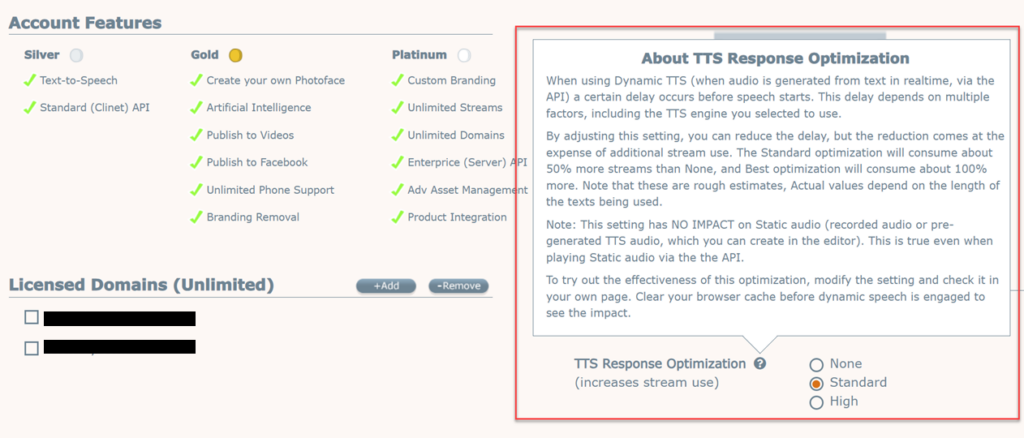
Recently we’ve gone a step further, allowing users to fine-tune the process. You now have the option to select the optimization level you prefer. There is a balance to be had though, because more segments means more stream usage.
Three optimization levels are provided. ‘Normal’ – which is the mid-level choice – is the default, and should be appropriate for most implementations. If you are using our 3rd party TTS voices tough, in particular Eleven Labs or Open AI voices, you may want to select the ‘High’ optimization setting. These providers require a bit more time to generate audios, especially longer ones (though improvements are being made all the time and this statement may not be true a few months hence).
Already mentioned above, but worth repeating, is that the length of the text is a major factor determining the time required to generate the audio. And the impact of the length of the text on response times is greater with some engines than with others.
The ‘High’ optimization setting improves the initial response time by segmenting the text input more aggressively. Specifically – the first segment becomes very short, and subsequent (longer) segments are also correspondingly shorter to allow for seamless playback.
But, as with all things, there is no free lunch. We mentioned that more segments mean a higher stream usage. But there is another caveat. Ideally, we prefer to break our audio segments at what we call “natural break points” – such as an end of sentence, or a comma. But with a more limited range in which to locate an optimal segment break point – it may not be possible in every case to select a natural one. This may result in a (barely) noticeable segment break in mid sentence.
So it’s a tradeoff. The best way to decide is to try. The ‘TTS Response Optimization’ setting can be found in your SitePal Account’s ‘Settings’ page, and it affects all avatars published from your account.
We hope this information proves useful. Please reach out to us with any questions or comments. We’d love to hear from you.
We’ve just introduced our No Code solution for creating Intelligent agents. And we mean NO PROGRAMMING AT ALL.
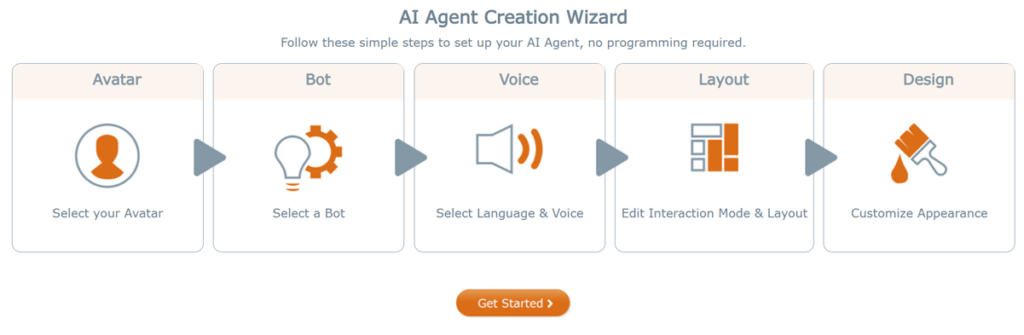
The new AI Wizard allows you to create your own AI Agent speaking avatar solution with a few simple steps. Select the relevant options (the avatar, the voice, design settings & more) & publish to your web page.
Both text input and speech input are supported options to choose from. So your users and customers can talk or text with your Agent.
Our No Code solution has been verified to work on all platforms, including mobile. We’ve done the heavy lifting so you don’t have to.
Check it out on the SitePal home page at https://www.sitepal.com
To create your own, login to your SitePal account and select ‘AI Agents’ from the main menu. The rest is self explanatory.
For detailed step-by-step instructions & much more, see our technical note –
This new feature is included with your Gold Plan or higher subscription – no extra cost on our end.
However – you do need to sign up for one of our pre-integrated partner solutions for the AI Bot portion – ChatGPT, Chatbase, Google DialogFlow or Pandorabots. We recommend Chatbase as the simplest to use & easiest to pick up. Just point it to your web page and your documentation – and it instantly becomes an expert on all things related to your business.
Coming soon – SitePal will offer its own built in AI Bot solution, making it unnecessary to use any 3rd party. Stay tuned for more updates – these are exciting times!
Eleven Labs (EL) have just introduced a faster TTS model, Flash 2.5, which is specifically geared towards conversational agents. See their announcement here – https://www.youtube.com/watch?v=0YmHnkTVkFA
According to EL, speed is faster & quality is lower.
We reviewed the new model and can confirm that in the SitePal environment overall latency is reduced by 15% to 20% on average for English. For non-English improvement is much greater – with average latency reduced by 50% to %60.
As the new model is multilingual it can be used for all supported languages, which is why latency for non-English is more significantly improved. Until now, non-English input was processed using the slower multilingual model.
We were not able to audibly detect loss of quality. We concluded that the difference in quality is not meaningful in an online conversation scenario.
We have therefore modified the API to use the new Flash v2.5 model as its default model for EL, which means it will be used if you do not specify a different model when calling the API.
This update is now implemented. There is nothing you need to do if you use the default engine.
If you prefer not to use the new default model, specify the model name in the xdata1 parameter when calling sayText or sayAI. To review this and other options for fine tuning EL audio generation, see details in the SitePal API reference. Check out the parameters for the sayText or sayAI functions & look for ‘xdata1’.
New model: model_id=eleven_flash_v2_5
Previously used model – for English: model_id=eleven_turbo_v2
Previously used model – for non-English: model_id=eleven_multilingual_v2
Eleven Labs (EL) TTS can be integrated with SitePal by adding your EL API key to your SitePal ‘Connect’ page, and is one of several 3rd party TTS providers available for use with SitePal Avatars, to complement the built in TTS voices. Using 3rd party TTS requires the Platinum Plan.
Hello SitePal Fans!
We are delighted to let you know that SitePal is now pre-integrated with Google DialogFlow
What does this mean, and how can you take advantage of it?
With current AI breakthroughs, new solutions are available from companies large and small. These solutions enable you to create your own LLM knwoledge base & teach it about any subject matter. What all these solutions have in common – they could use a face, a speaking avatar, to better interact.
Enter SitePal. We have made it our mission to create speaking avatars that not only work great and look great – but are 100% API driven. So they can be integrated with any AI solution.
YES, ANY AI SOLUTION CAN BE CONNECTED WITH A SITEPAL SPEAKING AVATAR.
This means that you can create an AI knowledge base (a ‘Bot’) which contains relevant information for your visitors, and use a SitePal character as an intelligent agent to communicate with your website visitors. You website visitors can learn about your products and services by conversing with your SitePal character.
While this is not hard to do, using our API, we have made it even easier by pre-Integrating with selected 3rd Party solutions. For these 3rd Parties – the required effort has been reduced to minimal configuration & setup work.
Thus far we have pre-Integrated with:
Chatbase
ChatGPT
Pandorabots
and now joined by –
Google’s Dialog Flow
The following technical example allows you to select a Bot to interact with. Select DialogFlow from the menu & try it out by asking questions.
So what do you need to do to create a useful DialogFlow implementation for your website?
In broad strokes the effort would consist of 2 parts:
1. Open a Google Cloud account and implement your DialogFlow AI persona. Teach your personal about your products (or anything else you want it to know)
2. Setup a SitePal character on your website to answer users questions by interacting with your DialogFlow persona.
The first part can be implemented using tools provided by Google. This is outside the scope of our explanation here – please google it to find out more.
The second part is where our Pre-Integration comes into play. To publish your SitePal character as a speaking DialogFlow driven intelligent agent, you need to add your Dialog Flow API JSON key file to your SitePal account. Then use our sayAI API call (yes, ONE call !) to have your character speak the responses to user questions.
We did the heavy lifting – so you don’t need to! It’s that easy.
Please see detailed step-by-step instructions in the following technical note – and start taking advantage of AI intelligent agent technology today!
Additional 3rdparty AI vendors will be integrated with SitePal in the coming months. If you have a specific one in mind, drop us a note and let us know. We will do our best to prioritize.
TTS Latency Optimization – we’ve recently come to realize that TTS response times have deteriorated due to increasing levels of usage. Both additional load and accumulated data have had a detrimental effect over time. We’ve just implemented an update to address the problem. With this update response times are now faster than they have ever been. In most use cases you should find that latency has been reduced by over 50%.
JavaScript Framework Examples – We’ve added new framework examples for ReactJS, NextJS, Angular and Vue. This should prove helpful as customers have repeatedly run into issues that were not covered by our initial technical example. We’ve identified a set of five examples that together cover most envisioned scenarios.
The following examples are now available for each framework:
Conversation Example: Multiple avatars, the use of Portals.
AI Text Example: Using the sayAI API with text input
AI Audio Example Using the sayAI API with audio input
All the examples come with full source code, and are available on the SitePal support page.
Access Audio Raw Data – Note: this feature is available to Platinum and Integrator Plan customers.
We’ve added a new API function ‘getAudioObject’ that enables access to the raw audio data as it is being played. To understand why this feature might be useful, let us share the scenario that brought this about.
In an AI Agent implementation our customer preferred to have an active mic at all times to allow users to interrupt the avatar. They used echo cancellation to eliminate avatar speech from the input & required access to the realtime audio data to make this work.
We’re sure customers will find other equally cool and unexpected ways to take advantage of this feature.
Eleven Labs Lip Sync Fix – due to special characteristics of Eleven Labs audios they were not being correctly processed, causing lipsync to be sub-par for Eleven Labs audios. This problem was identified and fixed on Aug 9th.
Also, if you’ve missed it please see our recent announcement on this blog regarding Chatbase Pre-Integration. We’re very excited about it.
Of our future plans & projects perhaps worth mentioning at this time are the following –
Flutter Support – we’re looking to add Flutter support and Flutter code examples to our support materials. This should be available in the next few weeks.
Photoface 3D API – the intention is to enable customers to enable their end users or customers with a Photoface like tool, that end users could use to create & use their own avatars. This feature will be available to Integrator Plan customers only. This project is in the planning phase. Please contact us if you have an interest in this capability.
That’s it for the moment. We hope that you have found this information useful. Please contact us with any comments or questions. We’d love to receive your feedback.
We are delighted to let you know that SitePal is now pre-integrated with Chatbase, one of the leading tools for creating AI chatbots for business.
While this blog post is similar to one we posted several months ago regarding ChatGPT integration, the information here and in the referenced docs is updated and includes new relevant details. Also – this is a different AI Bot solution, with what we believe to be greater potential for businesses to take advantage of.
So what does this mean for you, and how can you take advantage of it?
With Chatbase you can easily create an AI Bot which knows all about your business and products, and then use a SitePal avatar as an Intelligent Agent to communicate with your website visitors. Your visitors could then learn about your products and services by conversing with your SitePal avatar!
And, you can do all that without complex programming! Creating your AI bot with Chatbase and teaching it all about your products, takes only moments (assuming you already have a website and/or documentation). Integrating it with SitePal requires copying your API key from your Chatbase account to your SitePal account. Yes, It’s that easy.
The following technical example allows you to select a Bot to interact with. Select ‘Chatbase’ from the menu & try it out by asking questions. Note: This Inteligent Agent was set up by scanning the SitePal Site and Blog, so it knows quite a bit about SitePal. Ask it!
At the risk of being slightly technical, let us explain what you actually need to do to create an Intelligent Agent implementation, using Chatbase, for your website.
In broad strokes the effort would consist of 2 parts:
1. Open an account with Chatbase and teach your bot all about your products & business by pointing it to your website(s) and/or uploading documents.
2. Setup a SitePal character on your website to answer users’ questions by connecting to your Chatbase bot.
The first part is done by using the simple tools provided by Chatbase. It’s totally straightforward.
The second part is where our Pre-Integration comes into play. To publish your SitePal character as a speaking Chatbase-driven Intelligent Agent, you need to add your Chatbase API key & Bot ID to your SitePal account. Then use our sayAI API call (yes, ONE call !) to have your character speak the responses to user questions.
We did the heavy lifting – so you don’t have to!
Please see detailed step-by-step instructions in the following technical note – and start taking advantage of intelligent agent technology today!
Additional 3rd party AI vendors will be integrated with SitePal soon. If you have a specific one in mind, drop us a note and let us know. We will do our best to prioritize.
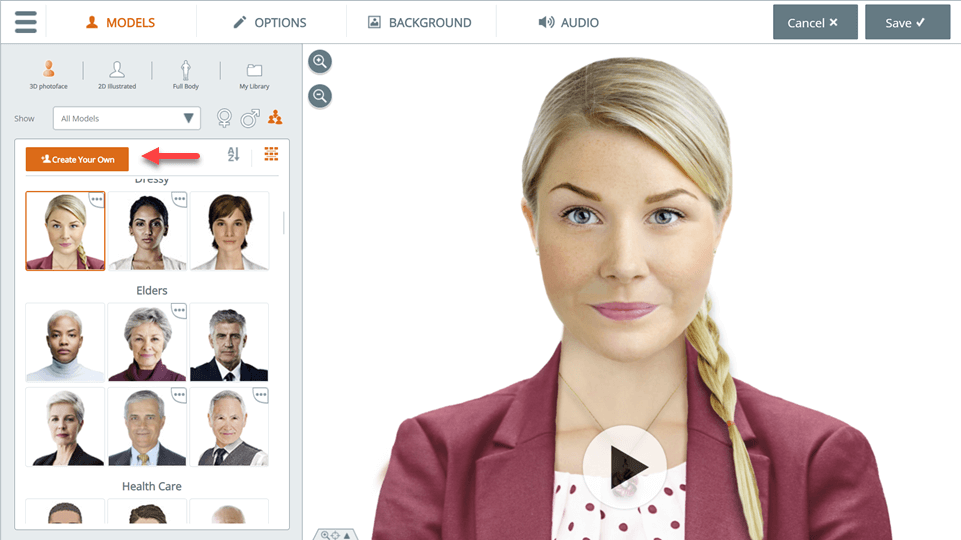
Photoface™ 3D is a SitePal® feature that enables you to create your own 3D character from a photo. To access this feature, open the SitePal Editor, and in the ‘Models’ tab click on ‘Create Your Own’.
Photoface 3D is available with the Gold Plan & higher
In this post we would like to share best practices and tips that should help you make the most of this unique feature. Getting good results with Photoface 3D is partly due to optimal photo selection, and partly to acquired skill with the creation process. We will discuss both.
I. Photo Selection Tips
Your first rule – pick photos that meet our guidelines –
Mouth closed (no teeth showing) – smile is ok
Face looking forward, directly at the camera
High quality, hi-resolution photo (more about this below)
Evenly lit & in focus – no shadows on the face
No eyeglasses, hair or other obstructions over the face. Facial hair should not be a problem.
High hair (a bun or Afro for example) can cause problems and should be avoided. Long flowing hair should not be a problem.
Optimal Resolution
So what is the right resolution to use?
Use a low resolution image – and your character may appear pixelated (grainy) when displayed on your web page. Use too high a resolution – and you’d be adding weight (download size) to your character unnecessarily.
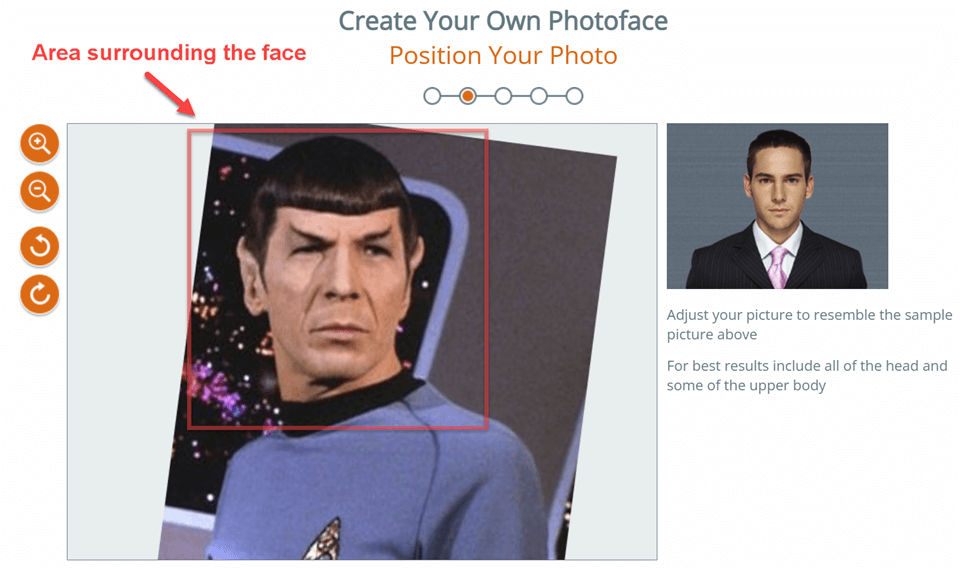
The rule of thumb is roughly 1000 x 1000 pixels for the area immediately surrounding the face (while the photo itself may be larger). There is not much value to be gained by using a higher resolution, because on most screens it is unlikely that that these extra pixels will come into play. But if your implementation has unique viewing characteristics, do the math & decide for yourself.
Image Composition
We suggest to use a photo that displays at least the upper part of the body, not just the head. For best results the body should be visible from below the chest & up. This will allow you to create a character with a large enough portion of the body, which will enable more flexibility when positioning on your web page.
Background – does it matter?
The Photoface 3D process does a pretty good job identifying the persons’ outline & auto-removing the background. But having a complex, noisy background can sometimes cause problems. While we do not require it, if you have the option we encourage the use of a uniform color background in your photo.
Pre-Edit the Image
Being fluent in Photoshop can be an advantage in certain cases. For example – a short neck (or no neck) photo can cause the shoulders to animate when the face moves. Sometimes that works well, and other times not so much. In those cases editing the photo by adding or extending the neck can help resolve.
Another example is the so called “high hair” scenario. In some images, the face might be slightly inclined forward, resulting in the upper scalp occupying a bit more of the vertical length of the face than it normally would. This can result in visual problems when the Avatar animates. Sometimes it can be addressed by adjusting the Camera Angle setting (see below). But it can also be improved by trimming the upper scalp. This phenomena can exacerbated when the face shape is long and narrow.
A long narrow face can result in “high-hair” distortion – slight trim of the upper scalp may help
Special Cases
Note that a photo may not work very well despite satisfying all requirements. Sometimes it is best to simply select a different photo. The opposite is also true – we sometimes see great results with faces that are off center, looking slightly sideways, or wearing eyeglasses.
Photoface 3D technology is optimized to the proportions of a “normal” human face. Faces with unusual proportions may not work very well. For example – an alien face with exceptional large or protruding eyes.
Despite that, we sometimes see customers achieve surprisingly good results with images of inanimate objects. A customer recently shared with us a very lovely “carrot face”, created by anthropomorphing an image of a carrot. We encourage you to use your imagination – but bear in mind that the tool was designed for human facial proportions.
Example of inanimate image that works nicely
II. The Photoface Editor – Suggestions & Tips
When you click on “Create Your Own” and initiate the Photoface process, there are 4 steps to go through:
1. Image upload & positioning
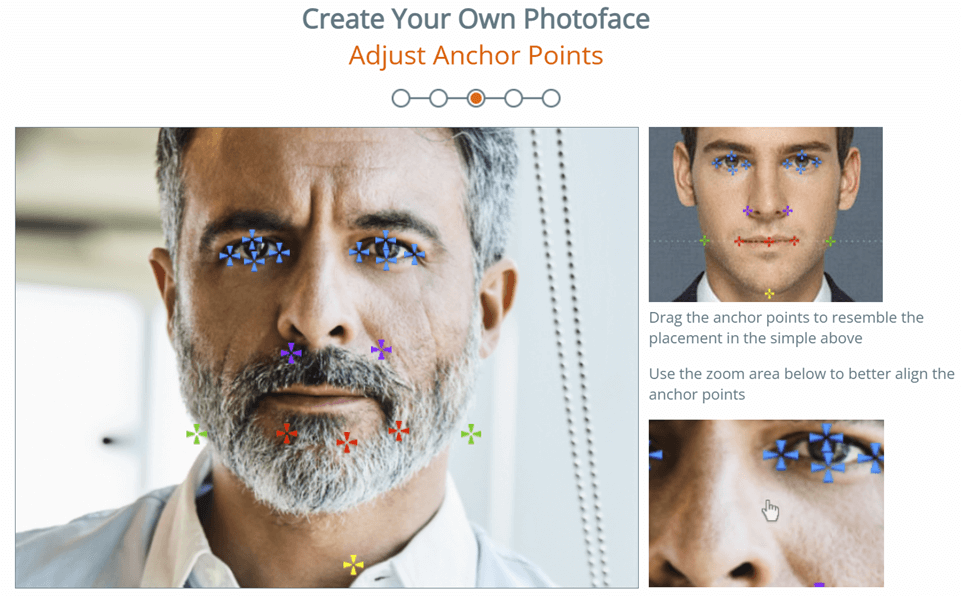
2. Anchor points placement
3. Masking the image
4. Finalizing your characters’ settings
Step 1 – Rotate & Scale
In the first step, your uploaded image is scaled and positioned automatically. Treat this initial positioning as a “first approximation”. It is up to you to fine-tune it.
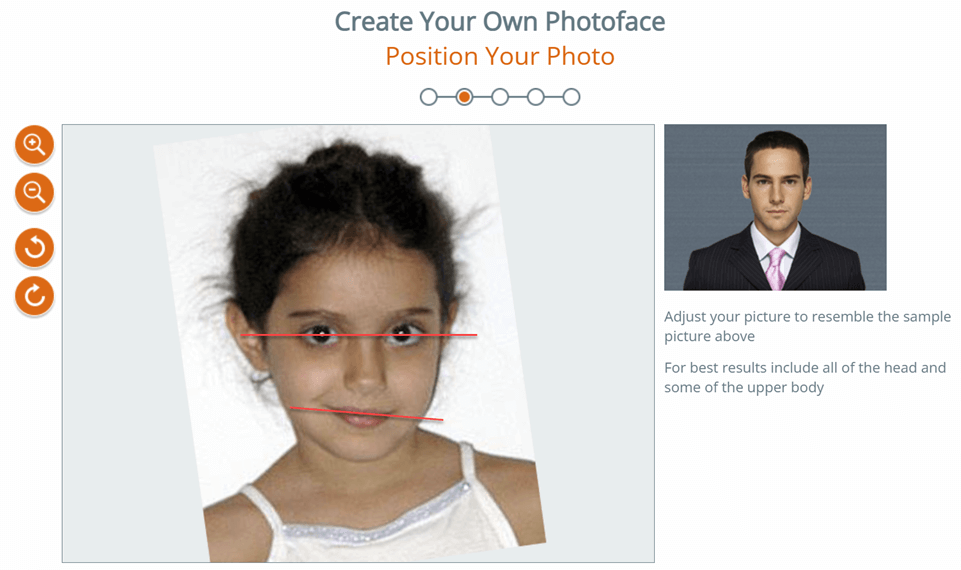
Rotation: be sure to position the face with the eyes horizontally aligned. In some photos the mouth and the “eye line” are not parallel – your priority should be to align the eyes. The mouth can be fine-tuned later.
Scale: As you position the photo in the frame, you may want to zoom out a bit, to allow more of the body into the frame. This positioning determines your final character’s visible extent. If the body is cut too short it may limit later positioning on your web page.
Make sure the eyes are horizontally aligned, adjust mouth later
Step 2 – Anchor Point Placement
In the second step we auto-position the anchor points for you based on facial image analysis. This should also be considered an “initial approximation” for you to review and edit.
Follow the positioning in the sample picture & adjust the points carefully as needed. The auto-placement frequently requires manual fine-tuning.
Sometimes initial point positioning is off – always check and adjust
Step 3 – Masking the Image
We recommend going with the deafult settings in this step, unless you have good reason not to. Automasking works well in most cases, and produces better results.
Step 4 – Final Settings
In the final step, detailed tools are provided to help you get the mouth just right. Try them out repeatedly, until you get a good feel for how each setting affects the result.
For example, you may need to extend the mouth slit – not too wide, and not too narrow, to enable the mouth to open naturally. You may need to position the mouth slit off center & play around with its curvature and vertical location. Faces are never symmetrical.
Check out the slider for teeth whiteness. Avoid teeth that are too bright – a good rule of thumb is to match the whites of the eyes in the photo.
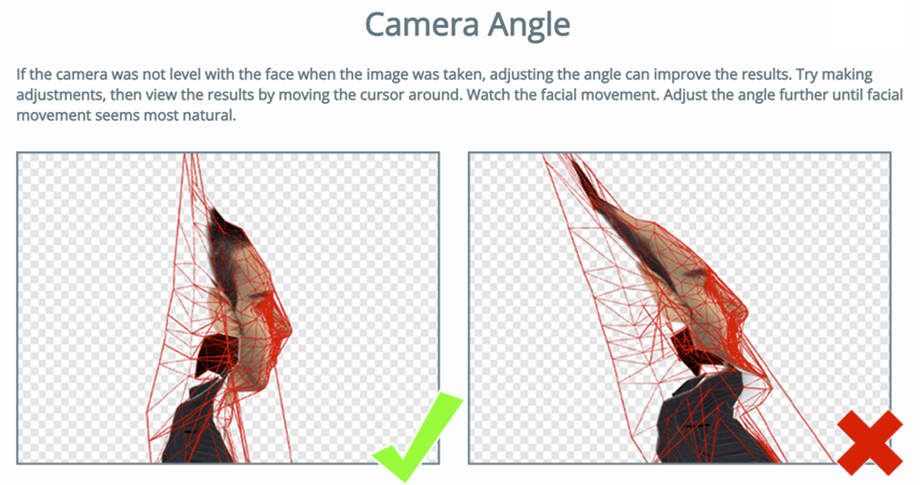
The “Camera Angle” setting can be very helpful. Play around with it to get a good feel for its effect.
Many times a face appears perfectly natural in the photo, and it is not immediately obvious that the photo was taken from slightly below the facial plain. This may cause the upper part of the head to stretch unnaturally as the head moves & can be a particular problem with naturally elongated faces.
Adjusting the camera angle can compensate & resolve.
Comments? Questions? Send us a note to: support@sitepal.com
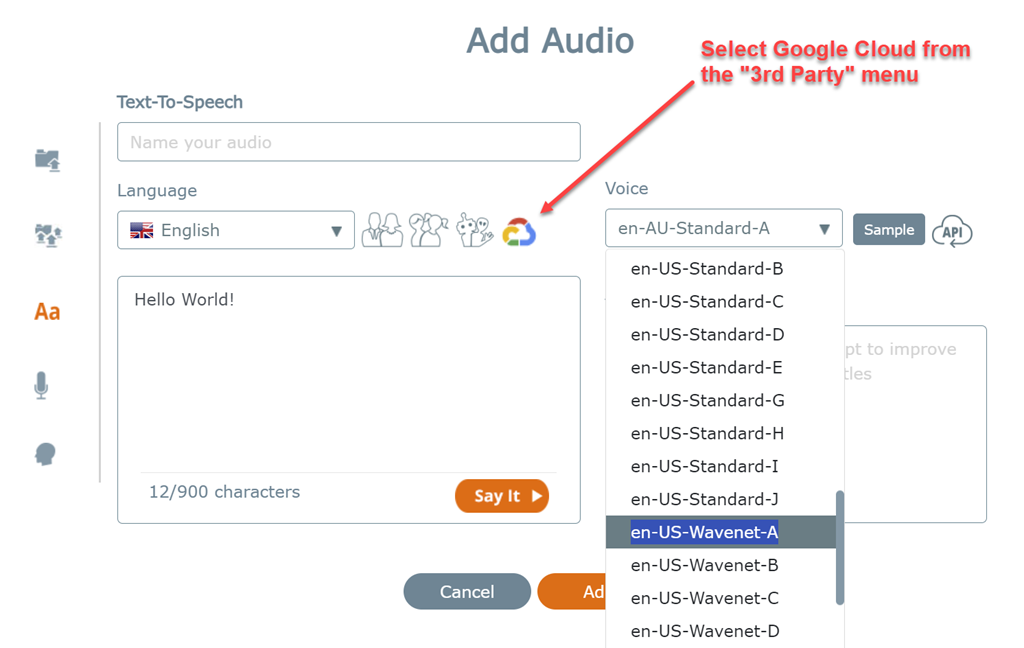
We’ve just completed our first 3rd Party Text-To-Speech integration – with Google Cloud TTS leading the way. This integration adds 284 Google voices to SitePal.
Before proceeding we’d like to make clear:
Using the new voices requires integrating your Google Cloud account with your SitePal account. This is done by adding your Google API key to your SitePal account’s “Connect” page. This is not difficult and requires no coding.
Thus the cost of generating the Google voices (if any) is borne by you, and not included in the SitePal subscription cost. Please bear in mind.
3rd Party TTS voice integration requires the SitePal Platinum Plan.
The integration covers Google’s Standard, Wavenet & Neural voices. For a complete list of the added voices, see our API Reference – see Engine 11 in Appendix B.
Note: some newly added Google Voices might not yet be available in SitePal, we’ll be adding those periodically.
Google voices can now be used in SitePal just like any of our built-in voices. The new voices can be used either Statically or Dynamically.
Statically – created using the UI in your SitePal account, and then assigned to your Scenes.
Dynamically – real time via the SitePal API. Response times and performance are excellent.
Tips:
If the audios that your avatar will speak are known in advance, it would be best to manually create, name & save the audios in your SitePal account, and then use the “sayAudio” API call to invoke speech dynamically (as opposed to using “sayText”). Doing so means that we will not access the Google API at runtime, thereby saving usage costs.
Separately – it’s worth noting that SitePal caches dynamic TTS and if an audio is frequently used it will likely be delivered from the cache. This optimization is built-in – you don’t need to do anything to turn it on.
We’re working on integrating additional 3rd Party TTS providers, with AWS Poly, MS-Azure and Eleven Labs next on our list.
Last but not least! – we’ve recently introduced great new Robotic characters, available now to all SitePal plans. Check out our entire collection here: www.sitepal.com/collection
New Robot avatars. Each of them has several alternates.
With recent AI technology advances, we’re seeing the long sought after vision of a “Virtual Doctor” come closer to reality!
While a virtual healthcare professional is a prominent (and much needed) use case – this has enormous potential which is not limited to healthcare. The gap between available services and the public’s ability to take advantage of them is growing in every industry. With available options growing or changing by the day, it is likely that your customers cannot effectively understand or use your products without talking to someone.
We recently implemented integration with ChatGPT, which opens the door to any “Virtual Expert” type application. Industries from Insurance to Finance to Travel to Government Services and everything in between, can and will take advantage of AI Agents to make their products more accessible to the public.
How often have you heard the phrases: “If I could only talk to someone who understands all this!” – well, now the technology exists to truly make that happen.
To learn more about creating an AI Agent with SitePal and integrating with ChatGPT (or any 3rd party AI solution) see our recent blog entry – www.sitepal.com/blog?p=239.
So, with all that in mind we’ve just added several new healthcare professionals to our lineup. To review our full lineup of characters see: www.sitepal.com/collection, or create your own character from a photo using Photoface. If you need a custom character for your application – let us know.
We’re constantly working on new SitePal features & capabilities (and great new characters too!). Stay tuned for more updates…
ps. Why type your questions when you could speak them? Voice based interaction would be so much better! An idea whose time has come? We think so. Check out our latest AI Speech demo here – www.aispeechdemo.com
We are delighted to let you know that SitePal is now pre-integrated with ChatGPT.
What does this mean, and how can you take advantage of it?
SitePal has long supported building intelligent agents using its built-in AIML based capability. This means that you can create a knowledge base (a ‘Bot’) which contains relevant information for your visitors, and use a SitePal character as an intelligent agent to communicate with your website visitors. Your website visitors can learn about your products and services by conversing with your SitePal character.
We’ve now enhanced this capability with connectivity to 3rd party bots. The first such integration was with Pandorabots several weeks ago, now followed by OpenAI’s ChatGPT.
The following technical example allows you to select which Bot to interact with. Select ChatGPT from the menu & try it out by asking questions.
So what do you need to do to create a useful ChatGPT implementation for your website?
In broad strokes the effort would consist of 2 parts:
1. Open an account with OpenAI and teach your ChatGPT bot about your products (or anything else you want it to know)
2. Setup a SitePal character on your website to answer users questions by interacting with your ChatGPT bot.
The first part can be implemented using tools provided by OpenAI and other companies. This is outside the scope of our explanation here.
The second part is where our Pre-Integration comes into play. To publish your SitePal character as a speaking ChatGPT driven inteligent agent, you need to add your OpenAI API key to your SitePal account. Then use our sayAI API call (yes, ONE call !) to have your character speak the responses to user questions.
We did the heavy lifting – so you don’t need to! It’s that easy.
Please see detailed step-by-step instruction in the following technical note – and start taking advantage of intelligent agent technology today!
Additional 3rd party AI vendors will be integrated with SitePal in the coming months. If you have a specific one in mind, drop us a note and let us know. We will do our best to prioritize.
ps. Why type your questions when you can speak them? Talking to your bot would be so much better! An idea whose time has come? We think so. Check out our new AI Speech Demo here – www.aispeechdemo.com
We’ve received many inquiries about using SitePal with React Native, and we’ve worked hard to make that possible.
React Native makes building mobile apps much simpler as many developers are coming to realize. This is mainly because it allows web developers to capitalize on their existing expertise, but also because it is a cross platform tool that enables you to build native apps for both iOS and Android.
ps. If you are just starting out with SitePal, or it’s been a while since you used SitePal (so much has changed…) we encourage you to check out our video tutorials, available on our support page here – www.sitepal.com/support
Customers sometimes ask us whether SitePal characters’ lip animation can be improved.
Well, if you are using human recorded audio then the answer is yes! We recently launched a very useful update we’d like to make you aware of.
Note:
This improvement applies only to 3D characters & works only for English for now
For TTS – the improvement is automatically applied – see explanation below
When you upload (or record) an audio, you will now see a “transcript” section where you can add… yes, a text transcript of the audio.
The text transcript is used to improve our automated lip-sync analysis and produce better results.
How much better?
We put together two SitePal Scenes for you to compare. “Before” and “After” if you will. Unlike the Pepsi challenge – you’ll need to keep your eyes open! Take a look:
Uploaded without transcript: www.sitepal.com/geturl/?ss=2756599&sl=0&acc=7029566
Uploaded with transcript: www.sitepal.com/geturl/?ss=2756598&sl=0&acc=7029566
As you can see the improvement is noticeable. So when adding audios to your account do take the time to add a text transcript to each audio, it is well worth the effort. To apply this improvement to existing (recorded or uploaded) audios, you would need to re-upload your audios and enter a text transcript for each.
The other (unrelated) advantage of adding a text transcript to your audio is that it enables subtitle display. If subtitles are relevant to your implementation – we suggest reading the technical note “Adding Subtitles to your Scene”, on our support page.
Note:
for TTS (both static and dynamic) adding a transcript is usually unnecessary because the text used to generate the audio is automatically applied to enhance the Lip-Sync as well. So there’s nothing you need to do. But in some cases you may still benefit from adding transcript to your TTS text input. That might be the case if your TTS text is heavily phonetic, or contains SSML tags. A good way to think about it is: TTS text is meant to be machine readable. The transcript is meant to be human readable (whether used for Lip-Sync or subtitles or both). To the extent the TTS text is modified to enhance the former, you might benefit from the latter.
Oh, before we forget – do check out our new AI Demo – if you haven’t done so already! See – www.aispeechdemo.com
We’re actively working on additional features & capabilities (and new characters!) to be added soon… Stay tuned for more information.
( tip: click on the “die” button to select other SitePal characters )
The point of this demo is to showcase 2-way speech interface, coupled with SitePal integration. The specific AI bot integrated here is not the point – as SitePal can be used as the animated face for any AI chat bot.
To implement the speech recognition part we’re using the Web Speech API. The Web Speech API is an evolving web standard which is now built-in to most browsers* and can be used for speech recognition.
A technical example is also available on our support pages – where you can more easily peruse the source code and see how it is put together. See at:
As always – our examples are meant to be copied and used – so check out the source code of the page and feel free to use it with your SitePal account.
To learn more about implementing SitePal for your AI bot, send us a note to support@sitepal.com & ask for guidelines.
*Note: the Web Speech API is universally supported on all platforms and browsers – including mobile -with the exception of the Firefox browser. The demo (and example) automatically reverts to text input when Firefox is used.
Oh, and last but not least – we’ve just added new animal characters, now available to all SitePal customers. Check out our entire collection here – https://sitepal.com/collection
As always, we’re actively working on additional features & capabilities (and new characters!) to be added soon… Stay tuned for more information.
We have long offered built-in AI knowledge base creation (known as SitePal AIMC) – and we are proud to have recognized the value and practical potential of AI so early on (more than 15 years ago…)
At the same time we also recognize there are many AI solutions out there, using different technologies, and designed for different audiences and use cases. There IS ONE THING they all share though: they can all benefit from an animated speaking avatar as their (user-inter) Face. After all – why communicate via text when you can do so by speaking? An idea whose time has come? We think so.
So we’ve gone ahead and done two things:
1. We’ve implemented 3rd party AI integration
2. We’ve demonstrated how to connect with the Web Speech API to enable speech input.
Let’s go over these one by one and explain exactly what we mean.
Part I – 3rd Party AI Integration
Our customers have been integrating SitePal characters with their 3rd party AI for years, so what’s changed? What’s new now is that we’ve gone ahead and made it much simpler to do.
Instead of implementing API connectivity from your web page to two services – SitePal & your AI provider – the AI programming interface is now taken care of by us. All you need to do is setup your 3rd Party API key in your SitePal account, and from that moment on, your SitePal character is connected! To implement you still need to use the SitePal API – but that’s all you need.
The first 3rd party AI solution to be integrated is Pandorabots – long a favorite of ours. We put together a technical example to demonstrate how it’s done. Check it out here, and feel free to view and use the source code of the page – that’s what it’s for!
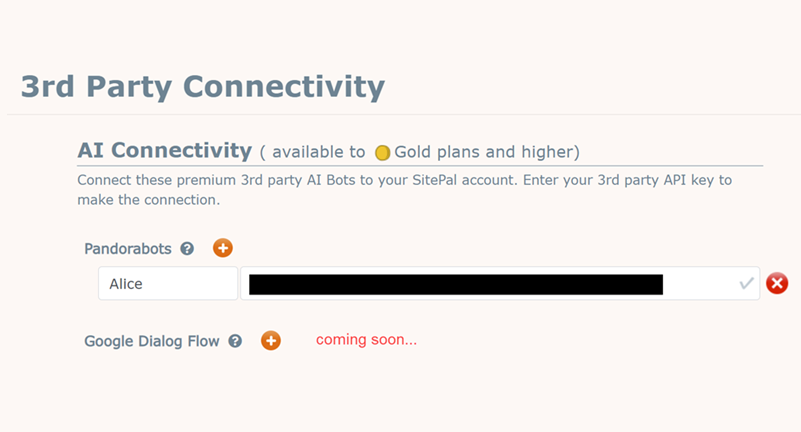
Pandorabots integration is available now to Gold plan users. Next on our list is Google Dialogflow, with other popular AI solutions to be added thereafter. Send us a note if you need a particular AI solution – we’ll add it to our to-do list.
Part II – Speaking to Your Speaking Character
The Web Speech API is an evolving web standard which is now built-in to most browsers* and can be used for speech recognition!
We’ve worked out how to add speech input to SitePal using the Web Speech API – and put together a working example – check it out:
As always – out examples are meant to be copied and used – so check out the source code of the page and feel free to use it.
*Note: the Web Speech API is now universally supported on all platforms and browsers – including mobile -with the exception of the Firefox browser. The example automatically reverts to text input when Firefox is used.
We’re actively working on additional new features & capabilities (and new characters!) to be added soon… Stay tuned for more information.
As 2022 is coming to a close, we’re so excited to look back and consider all that we’ve accomplished this year – and the many new SitePal users we’ve welcomed on board.
Welcome all!
With so many product updates added in the past 12 months, we thought we’d give you a quick run down – just in case you missed some of them (and also because we’re so proud of what we’ve done…! ).
So here goes – just the highlites:
Photoface Automated Image Masking
When creating a 3D character from your photo, you no longer need to spend time painstakingly outlining the outline of the persona. This task has been automated, so you can try out different images quickly!
Support for React, Angular and Vue Frameworks
Using NPM packages it is now a snap to integrate SitePal in your web project.
Audio Playback Limits – Removed
No more 90 seconds limit! Assign multiple audios to your Scene to be spoken in sequence. Or – if you are using the TTS API, you can now feed in text as long as you like. The 900 character limit has been removed.
New Tutorial Videos
Our new “Getting Started” tutorials are short (8 and 12 minutes respectively) but are jam packed with useful info and tips – and get you on board in no time.
“No-Javascript” Embed
You can now publish your SitePal to those pesky blogs or CMS or LMS systems that do not permit Javascript code. Yes – for real!
Subtitles Now Supported
Add text subtitles to your speaking character, in any language. The character & the displayed text conform responsively to the available space!
Speech Recognition Integration Example
Speak to your SitePal character – and it responds. How cool is that?
With full source code available – you can build your own!
3rd Party Integration – Pandorabots
Integration with Pandoarabots intelligent agents is now built-in. Just add your PB api key to your SitePal account – and your speaking character will be connected to your Pandorabots smarts. Now that’s intelligent! (with more integrations to come)
New User Interface
The new user interface improves usability and clarifies all aspects of SitePal use – as so many customers have told us!
And…. we’ve not even mentioned the huge cast of new characterswe’ve added this year. Do check them out.
As always – we’re actively working on new features & capabilities to be added soon… Stay tuned for more information.
Happy Hollidays!
The SitePal Team
www.sitepal.com
“What does your site say?”
ps. If you are looking to get started with SitePal, or it’s been a while since you used SitePal (so much has changed…) we encourage you to check out our new video tutorials, available on our support page here – www.sitepal.com/support
The use of animation in business is constantly increasing. Having an animated speaking character or characters representing your brand can create a more memorable and engaging way to communicate with your audience. In this blog post, we will explore the top animation character creators for your business.
Are you a business owner who is curious about AI marketing but unsure of where to begin? Undoubtedly, character animation is where you should start. We have listed 5 applications to make animated characters along with their top features to help you make the right choice.
How Character Animation Is Helping Businesses
Marketers today are increasingly using animated character visuals to promote their brand, products, and services. Due to the rising popularity of video marketing and its optimized outcomes, such characters can successfully deliver a message to an audience by being both entertaining and educational.
Marketers can better engage their consumers by using animation character creators for videos of all types -such as customer reviews, whiteboard animation, demo videos, and more.
How To Determine The Best Character Animator
Set a clear target
Choosing what you want to do with the animation character creator is the first step in making the best choice. Therefore, carefully decide what you want to accomplish before employing an animated character creator.
Create a list of the features you need
After deciding on your objective, you’ll have a good notion of the features you’ll require. As a result, you should then make a list of these capabilities and check for them as you filter through your selections.
Assess the learning curve that comes with it
If the software you pick is not user-friendly, then you’re in for a brain-racking experiment. And so, take into account your knowledge of and experience with character animation before making your choice. If you are just starting off, choose a tool that lets you make animated characters with ease and is designed for beginners.
With this in mind, let’s dive into the best animation character creators.
Best Tools For Character Animation
1. SitePal
SitePal is a cloud-based software application that prioritizes human touch-infused customer service on websites, web applications, retail in-store kiosks, and mobile apps. SitePal’s lifelike speaking avatars can speak in any language and can be used for customer support, sales, email marketing campaigns, e-learning, or to promote a product or service.
To make animated characters with a natural and authentic voice, SitePal is built to either use human recorded voice or cutting-edge text-to-speech technology. AWS Poly, Google TTS, and MS-Azure are a few of the pre-integrated text-to-speech services. This animation character creator does not require programming, but programmers can take advantage of a rich API to integrate your SitePal character with your website business logic.
SitePal provides a full range of 2D, 3D, and Full Body style characters to meet the needs of any website or mobile application. You can custom-design your own avatar from a photo using its versatile Photoface 3D feature. The platform comes with hundreds of built-in TTS voices in more than 40 different languages.
Doratoon is a cartoon character maker that provides a seamless experience while being simple to use. With the aid of the proper components, this animation character creator promises the capacity to produce custom films.
This tool has accessibility to make animated cartoons and is, therefore, an ideal option for cartoon creators. With the tools at hand, these elements aim to encourage imagination while perfectly animating the figures.
3. Adobe
Banners and cartoons can come to life with the use of interactive animations created using Adobe Animate for the web, TV, and gaming. Additionally, it helps users create infographics, eLearning materials, avatars, doodles, etc. for sharing across various platforms.
It is a potent animation and illustration tool for making augmented reality experiences for mobile and online content. The animation character creator offers drawing and sketching tools that let you use Adobe Fresco and experiment!
4. Vyond
For professional purposes, such as eLearning, training, sales, human resources, and marketing, animated videos, Vyond is a great tool. Create media right away using a bank of materials, pre-made templates, and a complete set of team collaboration capabilities.
With the help of audio, a library of templates, and props, one can easily change the generic into dynamic videos. Video production is simple and adaptable, producing good business results with impactful visuals.
5. Reallusion
Making 3D talking heads has become smoother with Reallusion’s CrazyTalk. This animation character creator is a facial animation program that has facilitated adding text and speech to the visuals. It incorporates a number of ground-breaking auto-motion capabilities which helps make animated characters.
The visuals may be used to create animated talking characters with the use of the 3D Head Creation tool. Unique animated picture albums, emails, and online greetings can all be generated.
What’s the Best Pick For Your Business?
As we decoded these character animation tools, selecting the right one is our last step. Note that a tool that works for your competition might not necessarily be a great fit for you. So, be sure to select the choice that is best suite to your specific needs.
We have found that uniquely among the solutions listed above, SitePal is the one tool that was designed first and foremost as an internet based solution. It is designed to work in a web browser and mobile app – and can be embedded, modified & updated with ease. SitePal is not a video based solution – which can be difficult to produce and costly to update. Its animated characters are lightweight and, once added to your page, both speech and appearance can be edited frequently without touching your web page again.
SitePal is easy, powerful, and professional, providing an all-in-one experience! If your business already has a branded character, SitePal can be used to create a custom avatar that brings your brand character to life. This way, you can instantly establish a brand identity across all mediums. And the best part, it’s a breeze to publish your character. Effortless plus quick! No programming knowledge required.
With its free 15-day trial, you’ll see how SitePal improves your customer service experience and converts potential prospects.